
Installing DSC Motion Sensors
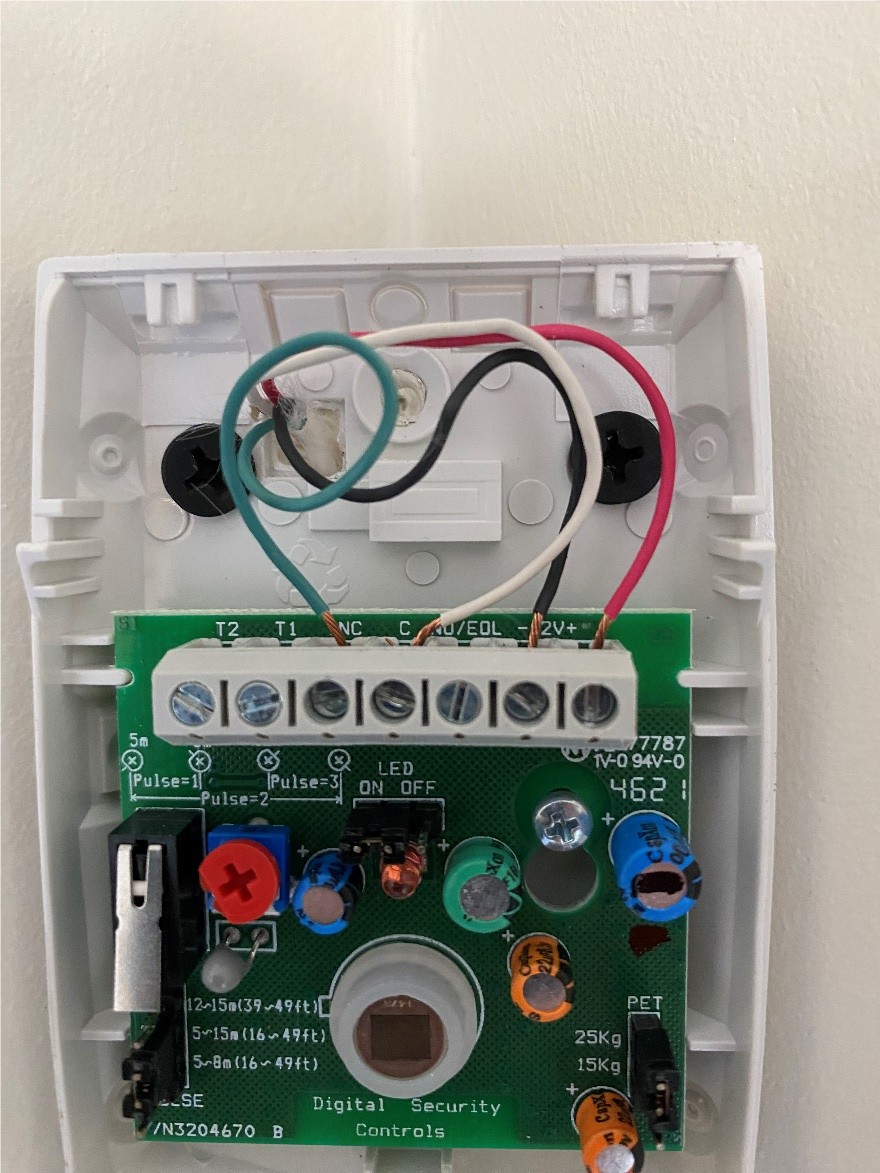
Basic instructions on how to install a DSC motion sensor such as the LC-100-PI
Recommended troubleshooting accessories
If your issue involves failing cables, adapters, power delivery, or AV accessories, this Amazon search may help you find compatible troubleshooting equipment.
As an Amazon Associate, AV Knowledge may earn from qualifying purchases.The Issue
Basic instructions on how to install a DSC motion sensor such as the LC-100-PI
Common Symptoms
- Does not register motion
- No power to motion sensor
- LED not responding as desired
Equipment Involved
Possible Causes
- Sensor is not powered on
- Wiring mismatch/loose wire
- LED switch set incorrectly
Steps to Resolve
Step 1
Sensor 12V+ (red wire) -> Aux + (control panel) OR VAUX (zone expander)
Step 2
Sensor 12V - (black wire) -> Aux - (control panel) OR BLK (zone expander)
Step 3
Sensor NC (green wire) -> Zone
Step 4
Sensor C (white/yellow wire) -> COM
Prevention
Ensure that all wires are properly secured in terminals.
Notes / Warnings
Do not allow copper from different wires to touch. This could result in undesirable behavior.
Still need help?
Ask a Query in the Community and include your equipment, symptoms, and what you have already tried.


Comments (0)
Log in to join the discussion.
Log inNo comments yet. Be the first to start the discussion.