
How to Wire A TRS Audio Cable to a Mono Input
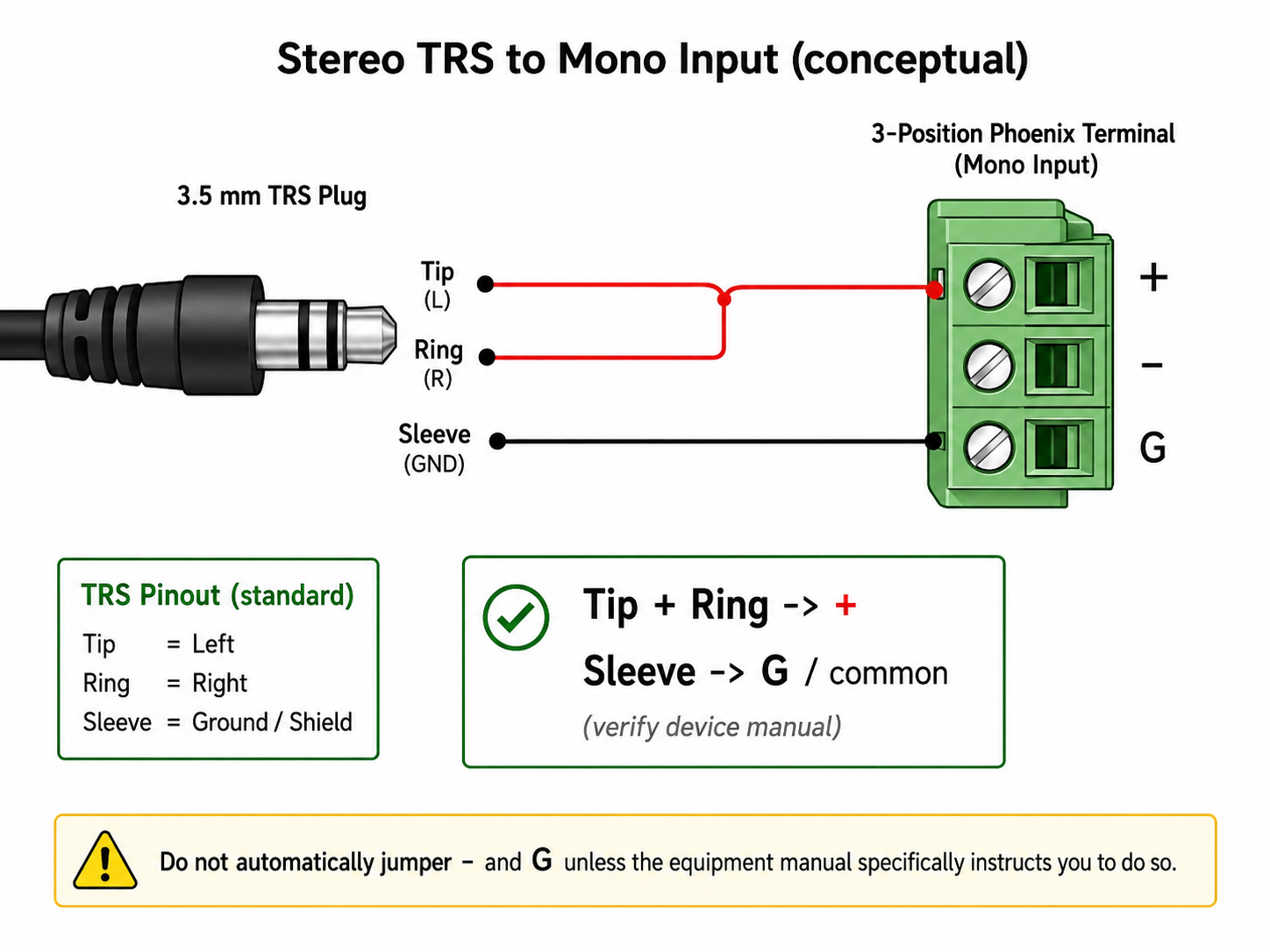
A TRS audio cable uses three conductors: tip , ring , and sleeve . In many audio systems, the tip carries the left audio signal, the ring carries the right audio signal, and the sleeve acts as ground or shield. If you need to feed a stereo TRS cable into a mono input, you may see instructions that say “tip and ring to positive.” This usually means the left and right audio signals are being combined into one mono feed.
Recommended troubleshooting accessories
If your issue involves failing cables, adapters, power delivery, or AV accessories, this Amazon search may help you find compatible troubleshooting equipment.
As an Amazon Associate, AV Knowledge may earn from qualifying purchases.The Issue
A TRS audio cable uses three conductors: tip, ring, and sleeve. In many audio systems, the tip carries the left audio signal, the ring carries the right audio signal, and the sleeve acts as ground or shield. If you need to feed a stereo TRS cable into a mono input, you may see instructions that say “tip and ring to positive.” This usually means the left and right audio signals are being combined into one mono feed.
Common Symptoms
- A mono input only plays one side of a stereo source
- Audio is missing because only the tip or ring is connected
- A stereo aux source needs to feed a mono amplifier input
- A paging or background music input needs a combined mono signal
- One speaker zone is missing part of the audio mix
Equipment Involved
Possible Causes
- Tip/ring/sleeve are landed incorrectly
- The terminal block expects balanced mono, not unbalanced stereo
- The source output is too weak
- Bad or broken TRS cable
Steps to Resolve
Step 1
Turn off the equipment
Step 2
Identify the TRS conductors
Step 3
Connect tip and ring to positive
Step 4
Connect sleeve to negative or ground
Step 5
Add jumper wires only between the matching terminals shown by the device wiring plan
Step 6
Test at low volume
Prevention
Notes / Warnings
This method is generally used for line-level audio, such as headphone outputs, aux outputs, paging inputs, or audio interface inputs. It should not be used on speaker-level outputs unless the equipment manual specifically allows it.
Still need help?
Ask a Query in the Community and include your equipment, symptoms, and what you have already tried.


Comments (0)
Log in to join the discussion.
Log inNo comments yet. Be the first to start the discussion.